Creating Custom Dashboards
Last updated: February 19, 2026
Build dashboards tailored to your organization's needs.
Click the + next to the Dashboards menu to get started
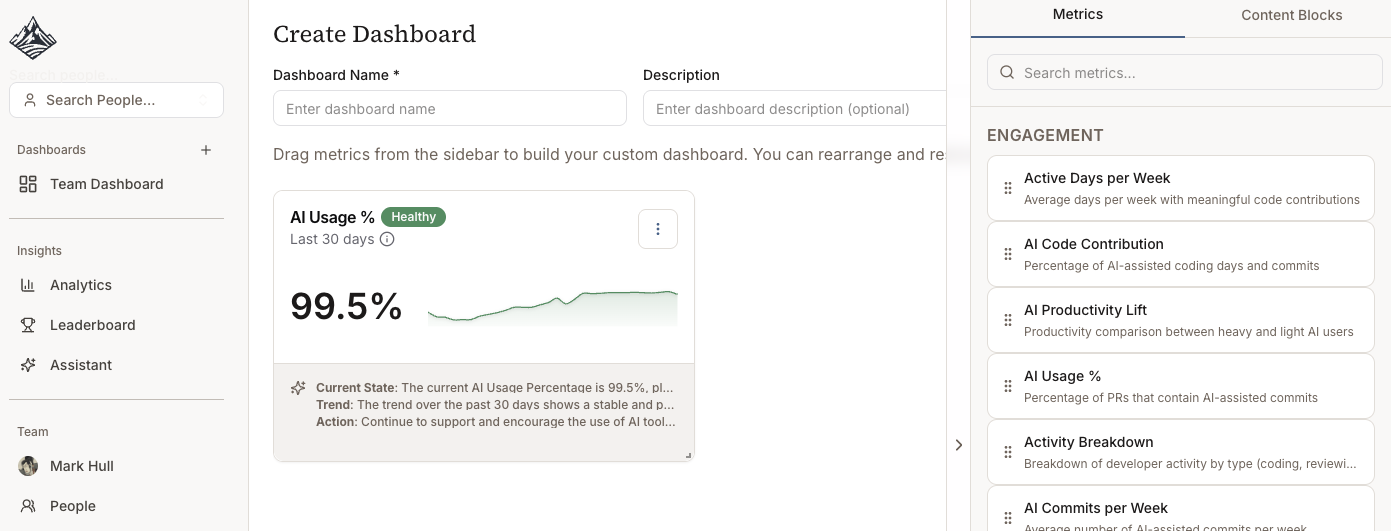
Example Dashboard Models
Executive Dashboard
High-level KPIs
ROI metrics
Trend summaries
Team Lead Dashboard
Team performance
Individual coaching insights
Quality alerts
Tool Evaluation Dashboard
AI tool comparison
Cost per productivity gain
Adoption rates by tool
Building a Dashboard
Select metrics - Choose from available metrics
Set filters - Team, repo, time range, AI tool
Choose visualization - Line chart, bar chart, table
Set thresholds (coming soon) - Define healthy/watch/alert ranges
Best Practices
Start simple - 3-5 key metrics
Align to goals - Match team OKRs
Review regularly - Update quarterly
Share widely - Make data accessible
Next: Individual Views